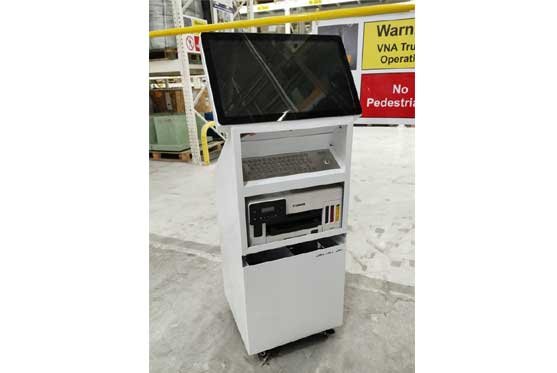
Windows Touch Kiosk

Windows Touch Kiosk – Interactive Self Service Kiosk

Availabe Size : 21.5 | 24 | 32 | 43

The Windows Touch Kiosk is a powerful interactive digital kiosk designed for self-service applications, customer engagement, information display and interactive digital experiences. Powered by a Windows operating system and a responsive touch screen display, it enables users to access applications, websites, digital forms, product information and multimedia content through an intuitive touch interface.
Designed for commercial and professional environments, the Windows Interactive Kiosk can be customized with different screen sizes, computing configurations, storage, connectivity options and peripheral devices to meet specific project requirements. Its modern floor-standing design makes it suitable for retail stores, shopping malls, corporate offices, hospitals, educational institutions, banks, hotels, exhibitions and public spaces.

APPLICATION AREA


Self-Service Kiosk
Enable customers and visitors to independently access services, submit information, browse options and complete digital processes through an interactive touchscreen.

Retail & Shopping Malls
Use interactive kiosks for product catalogues, product information, store directories, promotions, wayfinding and customer engagement.

Hotels & Hospitality
Windows touch kiosks can be used for guest check-in, hotel information, digital concierge services, restaurant menus, booking and visitor assistance.

Hospitals & Healthcare
Deploy interactive kiosks for patient registration, appointment booking, hospital navigation, information display and digital forms.

Banks & Financial Institutions
Use touch kiosks for customer information, digital forms, service selection, queue management and interactive financial services.

Corporate Offices
Ideal for visitor management, employee information, meeting-room booking, employee self-service and interactive presentations.

Education & Institutions
Interactive kiosks can provide digital learning content, campus information, admissions information, course details and student self-service facilities.

Exhibitions & Events
Use Windows interactive kiosks for product presentations, company profiles, digital brochures, lead generation, surveys and interactive demonstrations.

Museums & Public Information
Interactive touchscreen kiosks can provide digital exhibits, visitor information, maps, multilingual content and educational experiences.

Real Estate
Display property information, floor plans, project details, apartment configurations, videos and interactive property catalogues.


Windows Interactive Kiosk Applications
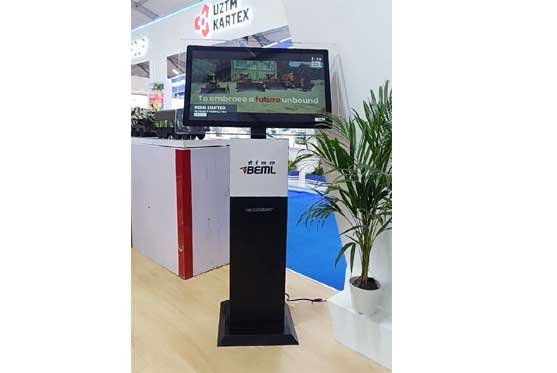
Windows Touch Kiosk is an interactive self-service kiosk powered by Windows OS and designed for customer interaction, information access, digital forms, self-service applications and interactive content. With a responsive touchscreen display and customizable hardware configuration, it is suitable for retail, shopping malls, hospitals, hotels, banks, corporate offices, educational institutions, exhibitions and public information areas.

KEY FEATURES

  • High-resolution interactive touch screen display
  • Windows operating system support
  • Powerful Intel-based computing platform
  • Multi-touch interface for an intuitive user experience
  • Full-screen kiosk mode for controlled applications
  • Supports websites and Windows-based applications
  • Wi-Fi and LAN connectivity
  • USB and other connectivity options
  • Built-in speakers for multimedia applications
  • Optional camera, microphone, printer and barcode/QR code scanner
  • Customizable screen sizes and hardware configurations
  • Secure and robust enclosure for commercial environments
  • Suitable for self-service and interactive applications
  • Custom branding, graphics and enclosure design available
  • Supports remote device and content management
  • Suitable for continuous commercial operation
  • Specifications

    • Panel Type : IPS
    • Resolution : 1920 x 1080
    • OS : Windows
    • Communication : Ethernet RJ45, Wi - Fi 802.11, Bluetooth
    • IO : USB, HDMI,
    • Colour : Black
    • Chipset : CORE i3/i5/i7
    • Ram : 8 GB | 16 GB | 32 GB
    • Capacity : 256 GB | 512 GB | 1 TB
    • Audio : 5W x 2 speaker
    • Installation : Floor Mount
    • Software : Windows